Contribution Guidelines
Guidance and best practices for writing and presenting a LUG meeting.
If you are considering helping us write LUG meetings, thank you! This document contains guidance for how to prepare for and deliver a great LUG meeting.
Please read:
What we need from you
Writing a LUG meeting has two big components. The first is your presentation materials, which are the things you will need to facilitate the meeting. This includes things like scripts, bulleted notes, full-on PowerPoints, or whatever it is you will bring with you the day of. See Meeting formats for tips on preparing your presentation materials.
Second, there is your writeup: a Markdown document that captures the whole content of your presentation in blog-post form. The writeup will appear as an article in the meetings listing on this website. The writeup may seem redundant, but it is meaningful because it acts as:
- Reference for those who couldn’t attend the in-person meeting
- Resume material for you
- Meeting material that can be referenced / repurposed years into the future
Meeting formats
Guidance on various meeting formats. We recommend you read the guidelines for the sections relevant to you, or skim all of them if you are unsure how you want to structure your meeting.
Dr. Thain is regarded as one of the best lecturers in the CSE department. Here are some things he does that you should do as well:
- Mind the time.
- Ask your audience questions. Some questions can be layups that make it easy to participate (ex. what operating system do you use?). My favorite questions are ones that are puzzling, or challenge your assumptions or understanding of a topic (ex. “how do you tell time?” or “can you kill a thread?”).
- Be interesting. dthain does jumping jacks, throws stuff, runs around, exaggerates his speech and expressions, etc. You don’t have to do all that, but don’t be afraid to tell a joke or have some personality. A good presenter is also an actor and a comedian.
- Pick one person in your audience and pay attention to how they react to you. You might notice boredom; then pick up the pace or move on. Confusion? Stop for questions. Sleepiness? Do something to regain attention.
- If you have a live demo, freeze it once it works (that is, don’t make any changes) and rehearse it before you present. Keep demos simple and sweet.
- Be careful about showing code. Code can be boring to look at, hard to read, and hard to reason through, especially if you aren’t the author. Keep code snippets focused and simple.
Slideshow
We assume you are already familiar with this format based on your experiences in class, but here are some things to keep in mind:
- Prioritize function, not form. LUG doesn’t have any bullshit “style points” you have to worry about (and neither will your future employer!).
- Begin your presentation with a brief agenda, and then at the end when you get to your Q/A slide, have it be the agenda (or your most interesting or question-worthy slide) to anticipate questions and requests to return to an earlier section to discuss it further.
Concerning text:
- Generally, prefer images and figures over text. Absolutely DO NOT prepare slides full of bulleted text and read directly from them.
- Avoid situations where your audience is trying to read text at the same time you are talking, because they can only focus on one or the other.
- Check contrast, and make your font size large.
Concerning figures and images:
- Blow them up so they occupy the entire space available on the slide.
- Try to give each important figure its own slide. This focuses the audiences attention and makes things easier to see.
- Always start the y-axis at zero. Clearly label your axes and title the figure. Speak on the interesting features of the data, and address anything that looks strange or that you don’t understand.
Chalk Talk
A chalk talk is like a classic classroom lecture – you orate your presentation while you draw figures on the board. Typically you would supplement this with a live demo or two on your laptop.
This style poses some challenges:
- It is hard to write and draw legibly on a chalkboard.
- Drawing is slow, and will requires thought and attention to pace properly.
- This style forces you to understand what you are presenting on more deeply, since you will not have bulleted slides or speaker notes to read from.
A good chalk talk is engaging and easy to follow, because the pace at which the audience is fed information is only be as fast as you can draw it and explain it. This naturally helps slow things down, and makes it very easy to take notes (the audience can just write exactly what you write).
A bad chalk talk is illegible, poorly paced (slow), and boring.
Here’s how to prepare a good chalk talk: Write your notes on a piece of 8 1/2" x
11" paper divided horizontally into “chalkboards”. Your notes should contain the
figures you intend to draw, with annotations that help guide your oration. Here
is an example: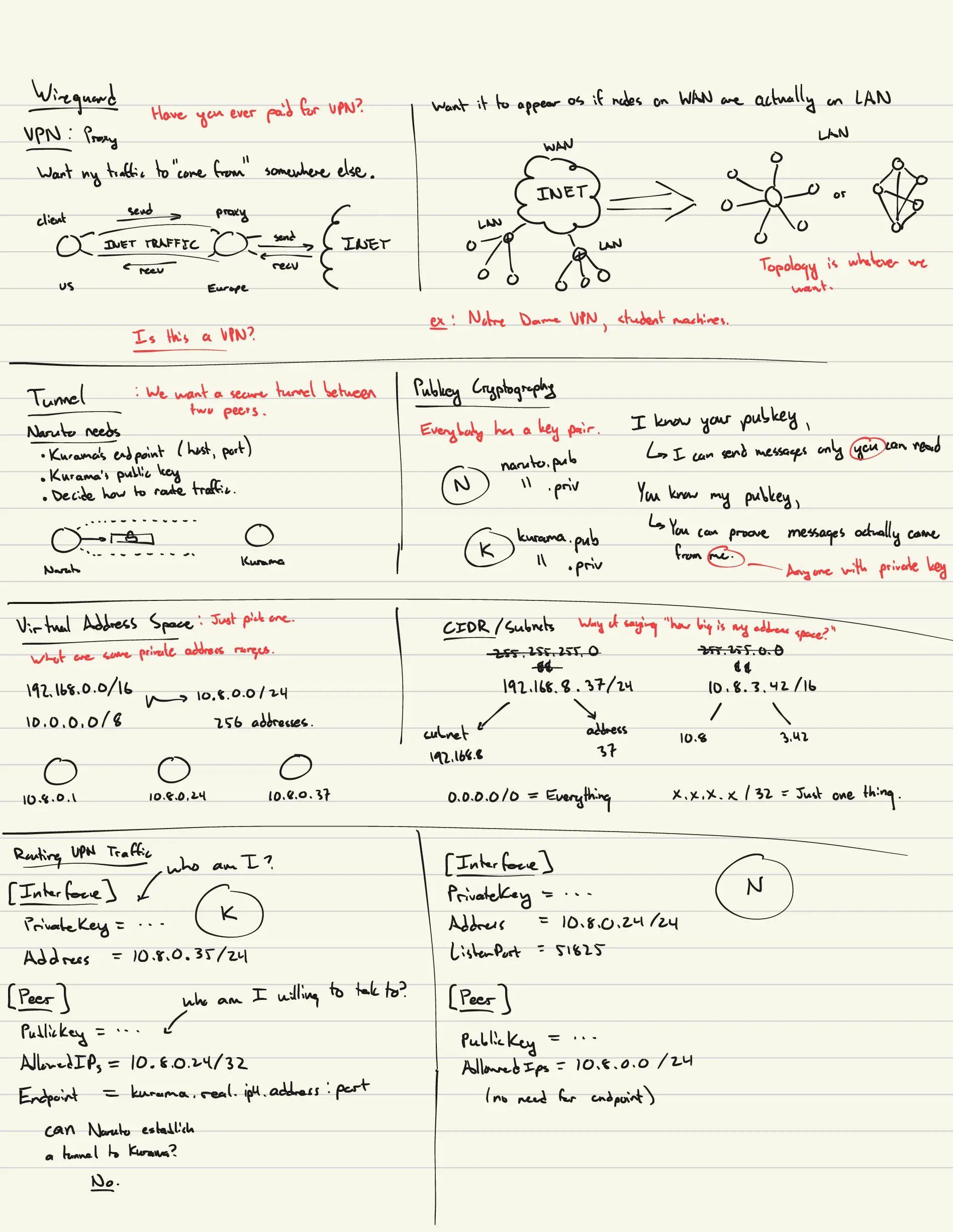
When planning figures, try to draw things once and reuse them where possible, and try to leave things on the board for as long as possible before erasing them. Often, you might refer back to something you drew earlier, or someone will ask you a question about it, and it is helpful to still have that figure handy. You should assume people listening are lagging about 30s - 1m behind what you are doing presently, so if you obscure or erase something before that time, you likely interrupted someone’s thought process as they were trying to read what you wrote and digest it.
Really quick. This is the achilles heel of the slideshow format! Often, lecturers will give a “cookie clicker” slideshow presentation, where there are far too many slides, and a given slide is only visible for a few short seconds before it is out of sight. Or, worse yet, the presenter jumps around between several slides scattered about the deck as they speak. How can an audience possibly hope to follow along in those conditions? Why should they care to?
Practice your presentation beforehand on a chalkboard, and record yourself. You might find that your handwriting is unreadable or that you wildly over/under- estimated the time you took. These things should inform some revisions and help you improve.
Workshop
Workshops are much harder to plan than presentations, and they are prone to Murphy’s Law. Avoid getting in over your head preparing a workshop when a similar effect could have been achieved with a presentation. One problem we’ve had with workshops in the past is that they are often bogged down by tedious software installation / setup on the part of the attendees, and sometimes involve standing up infrastructure on the part of the presenters. This pattern leads to really poor participation and pacing most of the time.
Examples: to do a Linux installation workshop, the presenters need to come prepared with a bunch of USB installation media (which is a PITA), and attendees need to be able and willing to wipe their laptop’s disk or partition it… and no one wants to do that.
To do a workshop on VMs, you need attendees to install a VM host on their laptops (which is a PITA) or have some kind of VM cluster prepared for attendees to SSH into (also a PITA).
Once we did a workshop on VPNs, and the University firewall stuffed all the connections, but only when the workshop host was on the specific subnet in Fitz.
henryj099 suggested furnishing attendees with a “PREREQUISITES.md” document that contains a guide for how to install all the software or do all the configuration necessary for the workshop. Then, you can skip all that junk and get right to the interesting bits during the workshop. This seems to be a good idea.
Be sure to thoroughly test your workshop beforehand.
Reading Group
A reading group is a guided reading of someone else’s material. Maybe you found a really interesting Hacker News article that you want to share. Maybe you found a cool incident report that you want to talk about.
Is is good practice to curate brief portions of the source material that are the most interesting to read together, and fill the rest of the time with commentary elaborating on the piece or walking the audience through it like a narrative.
The biggest pitfall with this format is opening a PDF and reading straight from the document. Audience members might as well read it themselves. What spin, insight, context, and perspective can you add that makes it worthwhile to the group?
Workflow
Here is the lifecycle of a typical LUG meeting:
- A presenter volunteers to give a LUG talk on a topic of their choosing
- Officers give feedback on topic choice and give presenter a meeting date
- Presenter is granted access to the NDLUG Github organization, the repo for this website, and the club’s shared Google Drive
- Presenter is assigned an issue to track progress on their work for the meeting.
- Presenter creates a branch on the website repo named
[GITHUB_USERNAME]/[MEETING_NAME] - Presenter writes and saves presentation materials to the Google Drive, and writes, commits, and pushes their writeup to their branch on the website repo
- Officers follow up occasionally and provide feedback on presenter’s work
- Presenter completes meeting, opens a PR for their site changes
- Officers mark the Github issue as complete and close the issue
If you have any questions, reach out to one of the officers
LLM policy
This website promises:
All of the content on this site is original, written by humans.
Therefore, please do not use LLMs for generate any of the written elements of your writeup or presentation materials. Use of LLMs for other purposes, such as research or image/figure generation, is OK. You are ultimately responsible for the authenticity and correctness of what you contribute.