Embedded Linux with Yocto Project
An introduction to Yocto Project, the industry-standard suite of developer tools for embedded Linux software projects.
What is Embedded Linux?
The term “Embedded” is often used to describe a computer which serves a specific purpose within a larger mechanical/electronic system. Development often involves working with custom printed circuit boards, microcontrollers, or a system with reduced compute resources aimed at a specific task rather than general use. Embedded design is important in industries like robotics, aviation, and any application where a general operating system is either overkill or undesirable in the name of efficiency.
If you’ve worked with microcontrollers before, you might be familiar with the different operating systems available to programmers:
- Bare Metal: No operating system. Essentially just a while loop.
- Run on the most extremely constrained microcontrollers
- Extremely low cost, code often writes bits directly to hardware
- Maximum control of timing -> you can probably calculate exact timing for your code based on instruction cycles
- Real Time Operating System (RTOS): Runs a lightweight scheduler. The
scheduler chooses which threads (different while loops) to run.
- Runs on microcontrollers who can handle the compute overhead of a lightweight RTOS.
- Also low cost, but more demand for compute and dedicated time for task scheduling.
- Still able to meet real time deadlines (it is called a Real Time OS), but timing considerations become a little more fuzzy with the scheduler in play.
- Operating System: Runs a full OS (almost always Linux). Contains complex
scheduling and more advanced memory management.
- Runs on much more complex hardware, microcontrollers can’t handle a “real” OS.
- Much more demanding of hardware resources.
- Not suitable for “real time” systems and not capable of reliably meeting timing deadlines.
As we run down this list our system complexity grows along with our ability to handle a wider variety of tasks. The first two options are much more desirable for their deterministic characteristics but sometimes a full OS is necessary due to application complexity. Linux, with its active community, and semi-lightweight nature compared to other OS’s seems like a good option. Virtually every device that runs a full OS runs Linux: smart TVs, routers, satellites, rockets, home appliances, Android phones, drones, and many other devices. Embedded Linux is the development and use of a Linux OS for a specific application like the ones I just described.
Why Yocto Project?
You’re probably familiar with well known distributions like Ubuntu or Red Hat. These distros present a problem. They are general purpose. They come with software for graphics, keyboard drivers, a package manager, and so many other pieces of software that you might need in a day to day scenario. Even Raspian OS, a distribution designed for the Raspberry Pi development boards, contains too much software that our embedded product won’t need on a daily basis. So, how do we create a distro that suits our unique scenario and only includes specific pieces of software we need?
Yocto Project is an open source project built specifically to customize the Linux kernel and create a Linux image specifically tailored to an embedded Linux application. It contains a variety of commonly used tools and features that allow you to (relatively) quickly customize the Linux kernel through use of standard patterns defined by the project. OpenEmbedded is an open source build system designed specifically for creating Embedded Linux distributions and is what Yocto Project uses to build an image. Yocto not only allows you to take pieces of commonly used and battle tested software directly from the Linux repository, but is also considered industry standard itself and has a vast network of support. Companies that sell embedded Linux SoCs often will have open source Yocto layers that do the hard part of making Linux work on their board.
The Layer Model
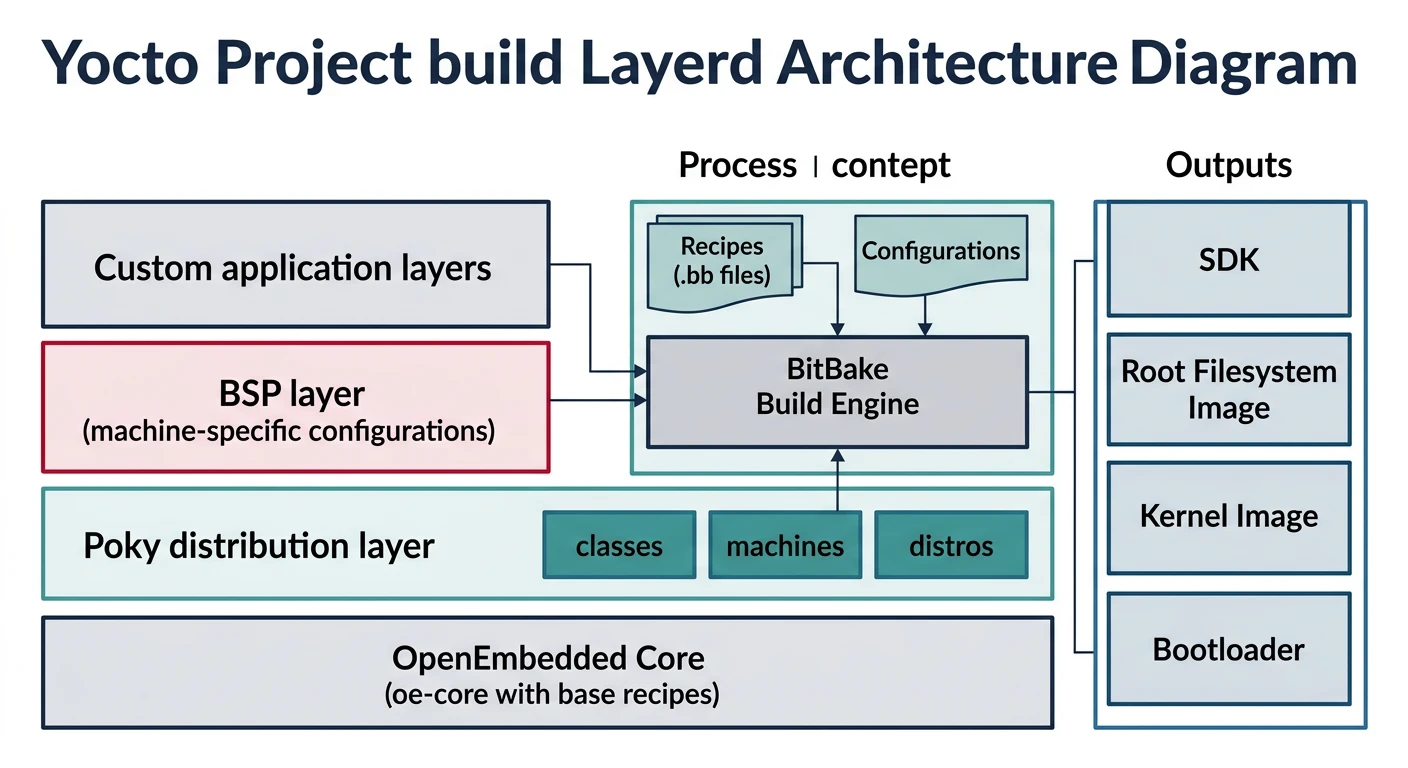
The common building block for a Yocto Linux distro is a layer. A layer is a repository containing a set of instructions which tell the build system what to do. It could contain any amount/type of code but the idea here is that layers are modular and easily swappable so that they can be integrated in projects with different hardware. For example, a vendor might provide a board support package (BSP) within a layer while you might create an application within a different layer. Both can be packaged and classified as a layer despite the different size and content.
Releases
Like most other software products, Yocto Project is versioned. When a Yocto version is released, Yocto layer package versions are locked in and are compatible with each other. Only fixes are applied and no major changes are made to packages. From there, developers either create new layers or adapt existing layers to work with specific versions. This often involves creating a branch within the repository named as the release name and modifying/updating source code within the layer to work with the designated packages that it depends on. Once a layer functions as expected with the designated packages, it is ready to be integrated with any other project that uses the same release version. Combining layers from different releases can result in undefined behavior and is something that should be avoided.
Yocto Provided Layers
Yocto project provides a few layers to serve either as necessary building blocks or references for building your own layers.
- meta (from openembedded-core): contains a plethora of foundational packages that are necessary for every Yocto Linux system (ex: systemd, busybox)
- meta-poky: an example distribution layer
- meta-yocto-bsp: an example bsp layer
meta-openembedded is a collection of layers that contains commonly used utilities and is something vendor layers often depend on.
Common Components
There are a few key pieces to our Yocto build system that determine what the build system will construct and how.
Configuration Files:
- Hold global definitions of variables
- Defines what to build and what to put in a particular image
- Can be used to select build behavior
Recipe:
- The common form of metadata stored in layers that will contain instructions for building packages to put into the final binary
- Defines dependencies, where to get the source code, and which patches to apply
Layers:
- A collection of related recipes that build something
- Layers are hierarchical in that they can be stacked, and layers higher on the stack can overwrite code and configuration within previous ones, allowing you to make changes to layers that aren’t your own.
Recipe Overview
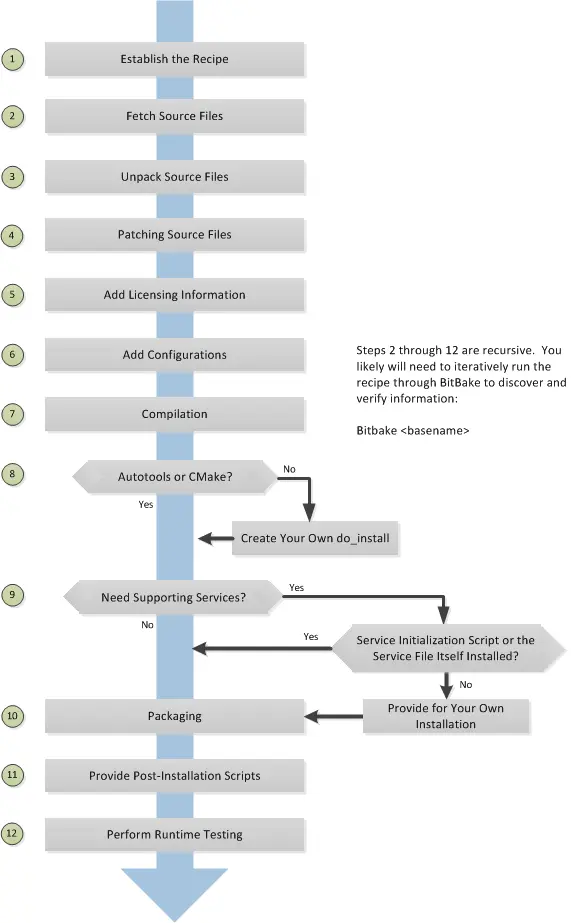
Recipes (.bb files) define how a given piece of source code should be
fetched, unpacked, patched, configured, compiled, and packaged for integration
into your Linux image. Yocto provides tools like devtool and recipetool to
generate basic recipe skeletons, but I’ve found it’s often more beneficial to
try to find someone who has done something the same or similar and take their
recipe as an example. Recipes are the most fundamental building block for this
build system, providing instructions on taking any piece of software from a
repository, modifying it, and compiling it for integration into the image.
Since layers are hierarchical, recipes within upper layers (our custom layers) can overwrite recipes within previous layers. This enables you to interact with and configure recipes within previous layers which aren’t yours. Making direct modifications to another developer’s layer within your build system is bad practice since the layer will no longer match its current upstream version. Modifying recipes within your own custom layer allows the entire build to become easily reproducible.
Making modifications to source code within layers that aren’t yours is an
important step especially when you want to use another developer’s kernel or
distro. devtool can facilitate this. To create patches, you first need to
generate a workspace which will pop up as a directory in your project. You can
then navigate to that workspace and make modifications using git just as you
would with any other software project. You can then navigate back to your
project and use devtool to generate patches for your layer based on your
commit history.
Architecture Diagram
Below we have a diagram outlining the build system that we have been discussing.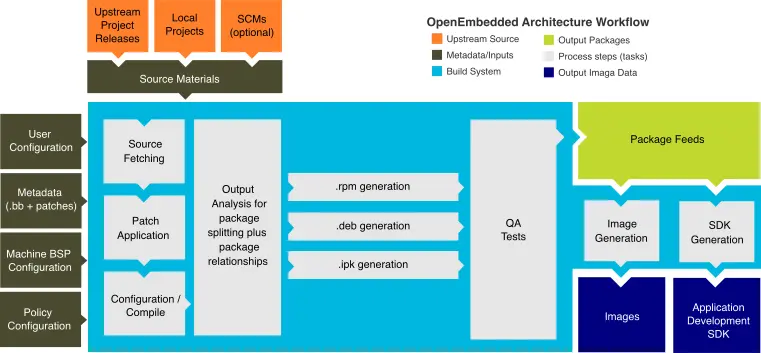
Overall our job lies within the gray boxes:
- Provide metadata through recipes and patches
- Define configuration options that tell yocto what to build
- Define repository sources where yocto can gather source code from
The build system then fetches source code, unpacks the source code, applies patches we defined, sets configuration options we defined, builds the source code, copies files to target directories, and packages files for integration into our custom image.
What Yocto Project Outputs
Short answer: whatever you want. You define what yocto project builds and outputs but the majority of the time you’ll be producing a Linux image that you can flash to your SoC along with some other build artifacts that you can use to analyze your build.
You can also produce an SDK that is compatable with your custom image which you can use to compile code to be run on your embedded Linux machine.
Design Pattern
When designing our own Linux distribution we want to take advantage of the layer structure of Yocto Project and the custom modular layers produced by board vendors and the community as a whole. There is a reason that this project exists. It’s very hard to design a custom BSP layer to support hardware and it’s not recommended by Yocto Project to attempt to do so. Instead include whatever layers are provided for you in your build. Sometimes a lightweight distribution will also be provided which you can either modify to create your own or use as a reference.
When you are designing an image, there will be two groups of layers. Ones that you do not maintain and should never edit and project specific ones that are custom made by you. The custom made layers should always come last when you define them. The layer model allows you to modify previous layers (layers below your own custom ones) through creating recipes and patches as noted before. All your work for creating your custom distribution should usually just take place in one layer which contains a combination of recipes that modify previous layers and new recipes that integrate your own software.
A Design Scenario: My SoC: Apalis IMX8
Toradex produces the Apalis IMX8 and supplies a BSP layer and kernel for customer use. Toradex has very good documentation on how to use and modify their layers and I’ve personally referred to them often.
To create my BSP layer, I bring in the meta-toradex-bsp-common layer and
satisfy its dependencies. It builds successfully but I want to make
modifications to support my own hardware devices which the board is connected
to. In my own layer I create a recipe that aligns with the name of the recipe
containing the source code I want to edit within meta-toradex-bsp-common. I
can then modify the recipe and create patches which change the device tree of
the kernel in order to assign pins that interface with my hardware device.
I want to use Torizon OS, an open source lightweight Linux distro, as a starting
point for my own OS since I am working with an Apalis IMX8 SoC. I first include
the meta-toradex-distro layer and satisfy its dependencies. However, this
distro comes with packages to support a graphical interface but my device will
be headless. I can find the recipe within meta-toradex-distro, create a recipe
of the same name within my own layer (the same one that we used to modify the
BSP) and create a .bbappends file that excludes that package from the image.
Sum Up
Yocto is the best tool for creating your own Embedded Linux distro. Despite its steep learning curve it remains an industry standard tool for creating images for use within a variety of embedded applications. I recommend learning to use Yocto especially if you are interested in (actually) hardware focused software. As you customize more of your distribution, you will have a lot of fun learning the intricacies of the Linux OS that are often hidden from the common user.
Further Reading
For further digging, I’d highly recommend referring to Yocto’s official site: Yocto Technical Overview
Toradex also has great documentation on Embedded OS development with their products: Toradex OS Development
A basic video tutorial series on Embedded Linux I recommend: Digikey - Introduction to Embedded Linux Part 1 - Buildroot